How to play a Catan-style game online with friends
To play a Catan-style game online with friends in Hearthsea, everyone makes a free account, the host creates a room, and friends join with a four-letter code. Hosting is free on every Classic, Seafarers and Cities & Knights map. Two to six players fit at one table, empty seats can be bots, and it runs in any modern browser.

What you need before the first game
To play Hearthsea online with friends you need a browser and a free Hearthsea account for each player. Hosting is free too.
- A device per player. Phones, tablets, laptops and desktops all work in a modern browser, and they can mix at one table.
- A free account per player. Sign up with an email address or a Google account, then pick a username: that’s how friends find you.
- Nothing to buy for Classic, Seafarers or Cities & Knights: whoever hosts can open a room on any of their maps, and nobody has a daily limit.
- For a Highlands or Skyfarers room, the host needs that expansion: the Highlands Pass or the Skyfarers Pass, $4.99 each, paid once. The friends you invite still play free.
Two to six people fit at one table. Empty seats can go to computer players, so three friends and a bot make a full four-player game.
How to start an online game with friends, step by step
- Everyone signs up at hearthsea.com/login.html and picks a name, then chooses a character to play as: a farmer, a shepherdess, a pirate queen and 14 more.
- The host opens Play, chooses online play and taps Create a room.
- The host picks the island and the rules: map, map size, fog, points to win, turn timer, discard limit, friendly robber and balanced dice.
- The host shares the room’s four-letter code in the group chat, or invites friends straight from the friends list.
- Friends enter the code under Join with a code, sit down and mark themselves ready.
- The host fills any empty seats with bots and starts the game.

If a friend’s phone drops out mid-game, they have two minutes to rejoin before a Merchant-level bot takes the seat and keeps playing for them, so the game never stalls.
Playing in the same room
You have two options when everyone is on one sofa.
Same-Wi-Fi play is free, like any online game. Each player scans a QR code with their own phone and plays with their cards hidden from everyone else. It feels closest to a board game night, with each hand of cards kept private.
Pass-and-play is free. One device goes round the table, and the game hides your hand between turns. It works best on a tablet in the middle of the table.
Settings that make a good game with friends
The defaults play like the classic board game: 10 points on a 19-hex island, a 7-card discard limit and two fair dice. Change them to fit your group.
For a game that fits in a lunch break
Lower the target to 7 or 8 points and pick the small map size. Add a turn timer of 60 or 90 seconds so nobody stalls.
For new players
Turn on the friendly robber, which leaves alone anyone with 2 points or fewer, and pick the Balanced map, which spreads resources and good corners more evenly. The guided first game teaches the rules as you play.
For groups who hate dice streaks
Balanced dice deal rolls from a shuffled set of all 36 combinations, so the totals land close to their real odds over a game. Fewer games are decided by a run of 4s.
For five or six players
Use Big Island, with 30 hexes and 11 harbors. With five or six at the table, turns are shared: after each turn, the player three seats to the left gets a short extra turn to build, so nobody waits long.

Playing over a video call
Most online board game nights happen on a call. A few things help:
- Run the call on a laptop and play on your phone, so the board gets the full screen.
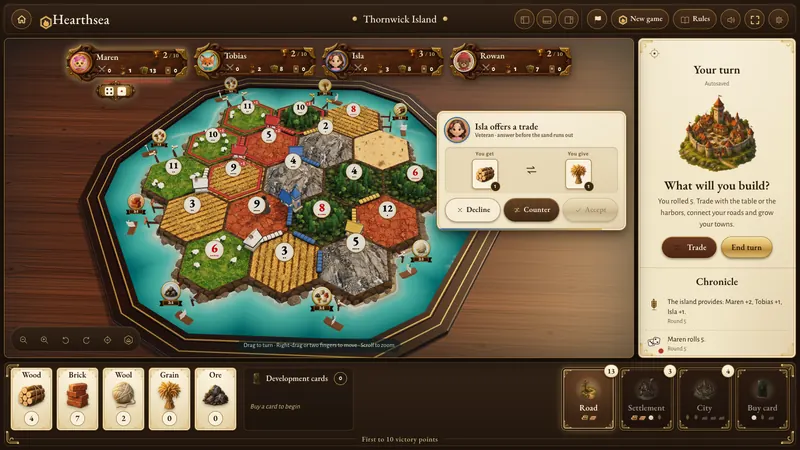
- Talk through trades out loud, then send the offer in the game. The offer panel shows everyone the exact cards.
- The Chronicle panel lists every roll, trade and steal. It settles “who took my brick?” arguments quickly.
- Let everyone pick a character. Each player sits at the table as one of 17 characters, and the others see it on their crest and in the hall before the game starts.

If a friend can’t get in
Most join problems come down to one of four things.
- The code. Room codes are four letters, like KQZT. Letters only, and capitals or lower case both work.
- Signing in. Online play needs an account, so a friend who opened the game without signing in sees a Sign in to play online screen first. A free account is all they need.
- The ready check. The host can’t start until every invited player has marked themselves ready, and the game names who it is still waiting for.
- A lost connection. If a phone locks or the Wi-Fi drops before the start, the host’s start button reports that the player lost connection. Once they reconnect, the game can begin.
When your friends are busy, quick match finds a table of strangers by mode, map size and player count, free on every account.
What playing with friends costs
For Classic, Seafarers and Cities & Knights, nothing: online rooms with friends and ranked quick match are free, with no daily limit, and each player needs a free account. Highlands and Skyfarers are optional expansions at $4.99 each, paid once. Only the host of a Highlands or Skyfarers room needs one, and every account plays one free game of each a day. We also sell cosmetics such as characters, house themes and paints, and none of them affect play. Full details are on the pricing page.
If you want to compare other ways to play this kind of game online, see our list of games like Catan you can play in a browser. And before game night, a quick read of the strategy guide will give you an edge on your friends.
Questions people ask
Do all my friends need to pay to play online?
No. Classic, Seafarers and Cities & Knights are free to host and to join, with no daily limit, and friends join with a free Hearthsea account. For a Highlands or Skyfarers room, only the host needs that expansion, at $4.99 once.
How many players can play online together?
Two to six. Any seat can be a person or a bot, so three friends and three bots make a full table. With five or six players, Hearthsea adds shared build turns so nobody waits long.
Can we play on phones?
Yes. Hearthsea runs in modern browsers on phones, tablets, laptops and desktops, and players on different devices can share one table. Nothing needs to be installed.
What happens if someone disconnects?
They have two minutes to rejoin. After that a Merchant-level bot takes their seat and keeps playing, so the game carries on for everyone else.
Can we play together for free?
Yes. Pass-and-play on one device is free and hides each hand between turns, and online and same-Wi-Fi games are free too on every Classic, Seafarers and Cities & Knights map.
Sources
Facts about Hearthsea come from the game itself and its rules and pricing pages. Facts about other games come from their own websites. All were checked on 6 October 2026.
Keep reading
Try it on a real table
Make a free account and play Classic, Seafarers or Cities & Knights on any map, against bots, pass-and-play or online with friends, with no daily limit.
CATAN is a registered trademark of Catan GmbH. Hearthsea is an independent game and is not affiliated with, endorsed by or sponsored by Catan GmbH or its publishers. Other game names belong to their owners and are used here only to describe and compare.